Cloudways Review: Managed Hosting Fit & Migration Guide
An evidence-based Cloudways guide covering Flexible vs Autonomous, provider choice, migration, backups, total cost, limitations, and who should use it.
Disclosure: WealthLab.life may earn a commission if you register through the Cloudways links on this page, at no additional cost to you. This editorial guide is based on Cloudways' published product and support documentation; it is not a hands-on benchmark of every plan or infrastructure provider.
Cloudways is a practical fit when you want a managed application layer—deployment, staging, backups, monitoring, SSL workflows, and support—without administering a raw VPS alone. It is less compelling when you need root-level control, the lowest possible infrastructure bill, custom system packages, or a platform that removes every WordPress scaling decision.
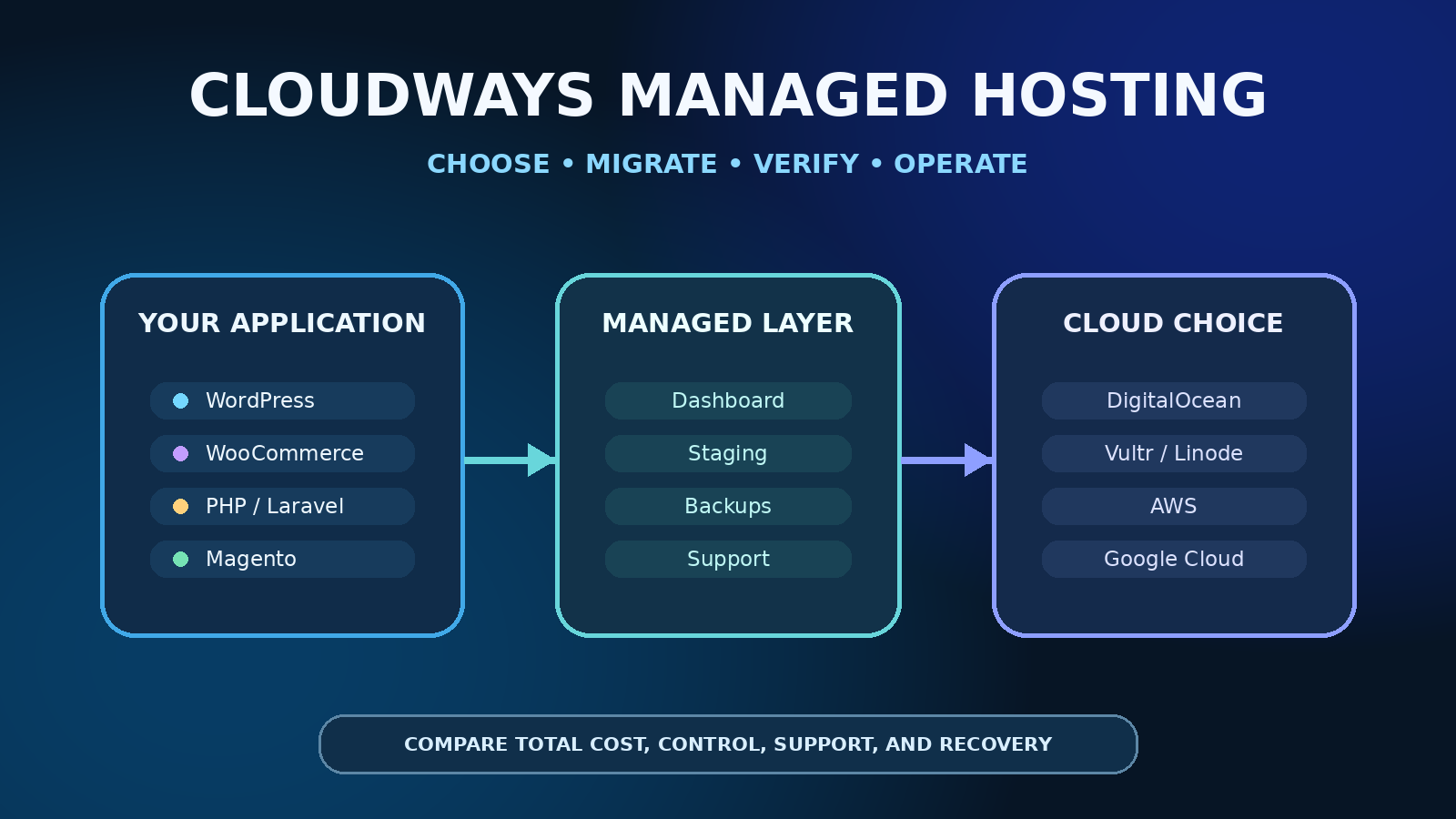
Cloudways is not the underlying cloud provider in the same sense as DigitalOcean, Vultr, AWS, Google Cloud, or Linode. Cloudways sits between your application and selected infrastructure, bundles a management experience around it, and bills you for that managed service. That distinction should drive the buying decision.
Quick verdict: who should choose Cloudways?
- Strong fit: agencies, small businesses, publishers, and developers running WordPress, WooCommerce, Magento, Laravel, or PHP applications who value operational convenience more than host-level control.
- Consider Flexible: when you want to choose a cloud provider, region, and server size while delegating much of the routine server management.
- Consider Autonomous: when a WordPress or WooCommerce workload has unpredictable traffic and you specifically need a managed autoscaling architecture.
- Choose a direct VPS instead: when your team can securely operate Linux, Docker, networking, backups, monitoring, patching, and recovery—and wants maximum control or lower infrastructure overhead.
- Choose another managed host: when your application, compliance model, support expectations, region, or pricing requirements do not match Cloudways.
If that managed operating model fits, review Cloudways through WealthLab's affiliate link. Before creating a paid server, compare the final checkout total and ongoing non-promotional cost with a direct VPS and at least one other managed host.
Cloudways Flexible versus Autonomous
Cloudways Flexible
Flexible is the closer match to traditional managed cloud hosting. Cloudways' current pricing page describes support for WordPress, Magento, Laravel, and general PHP applications. You select infrastructure, resources, and location, while Cloudways provides its control panel and managed stack.
This path preserves more infrastructure choice than a conventional single-platform WordPress host, but it is not equivalent to owning a direct provider account. Cloudways controls the supported operating stack and management workflow. Confirm application compatibility, supported PHP and database versions, scaling behavior, backup charges, and access boundaries before migration.
Cloudways Autonomous
Autonomous is positioned for WordPress and WooCommerce sites that need horizontal autoscaling, load balancing, redundancy, and failover without manual server sizing during traffic spikes. Cloudways describes it as Kubernetes-based and aimed at dynamic ecommerce, LMS, publishing, booking, and other traffic-sensitive sites.
Autonomous may reduce capacity-planning work, but it also changes the billing and operating model. Review base limits, overages, storage, bandwidth, backup inclusion, staging behavior, plugin compatibility, support scope, and the rollback path. Do not assume that “autoscaling” removes the need for application optimization, caching discipline, database maintenance, or observability.
Choosing the infrastructure provider on Flexible
Cloudways' provider guide currently documents DigitalOcean, Vultr, Linode, AWS, and Google Cloud as infrastructure options. Availability can vary by product and interface, so verify the exact choices shown in your account.
- DigitalOcean, Vultr, and Linode: commonly positioned as budget-oriented choices. Compare region availability, server family, included transfer, storage type, and resize limitations for the selected plan.
- AWS and Google Cloud: can suit teams that value their broader cloud footprint or specific infrastructure characteristics, but bandwidth and storage economics require closer review.
- Region: choose near the primary audience and required integrations, then measure application latency rather than relying on a provider label.
- Scaling: Cloudways' support guide notes that scaling behavior and downscaling options differ by provider and can involve downtime. Document the migration or cloning path before launch.
For the direct-infrastructure alternative, read WealthLab's DigitalOcean versus Vultr comparison and Docker VPS sizing guide. A direct VPS can cost less and expose more controls, but your team owns the operational work that Cloudways is designed to simplify.
What the managed layer can replace—and what it cannot
Cloudways advertises workflows for launching applications, staging, cloning, backups and restores, SSL, monitoring, team access, Git deployment, SSH/SFTP access, and support. Those features can remove repetitive setup and centralize common operations.
They do not replace application ownership. You still need to maintain WordPress, themes, plugins, application code, user accounts, domain settings, content, checkout integrations, and business-level recovery decisions. You also need independent monitoring and a portable copy of critical data. A control-panel restore button is useful, but it is not proof that the business can recover from account loss, bad credentials, corrupted backups, or provider-wide disruption.
Migration: validate before changing DNS
Cloudways currently documents both expert-assisted migration and a self-service WordPress Migrator plugin. Its support documentation says WordPress and WooCommerce users can use free migration paths, while non-WordPress managed migrations can have different plan allowances or fees.
- Create the destination application and choose a server size with migration and test headroom.
- Back up the source independently before giving migration access.
- Record DNS TTLs, mail records, cron jobs, redirects, certificates, object storage, CDN settings, and external integrations.
- Migrate into the Cloudways test URL without changing production DNS.
- Compare pages, forms, logins, checkout, media, search, redirects, scheduled jobs, email delivery, and application logs.
- Measure uncached and cached performance from relevant regions.
- Take a final delta copy or maintenance window when required.
- Change DNS only after acceptance checks pass, then keep the old environment recoverable through a defined rollback window.
Never send production credentials through unapproved channels. Rotate temporary migration passwords and remove old access after verification.
Backups and recovery checks
Cloudways' support documentation says off-site backups are required. For Flexible, backup storage can be billed separately based on usage; Autonomous documentation describes backup costs as included in the plan. Pricing and retention rules can change, so verify them for the exact product.
- Confirm backup frequency, retention, restore granularity, and geographic or account separation.
- Test a restore into a non-production application before relying on it.
- Keep an independent application-aware export outside the Cloudways account.
- Document DNS, certificates, environment variables, scheduled jobs, SMTP, integrations, and the order of recovery.
- Estimate recovery time and data loss under realistic failure scenarios.
Total-cost checklist
Do not compare only the headline server price. Build a monthly estimate that includes the server, backup storage, bandwidth or overages, premium support, CDN or security add-ons, transactional email, paid application plugins, tax, and staff time. Then compare that total with a direct VPS plus the labor and tooling needed to operate it safely.
- What will the plan cost after the introductory promotion ends?
- Which resource, traffic, storage, and bandwidth limits apply?
- Are backups, restores, staging, CDN, malware protection, or support add-ons included?
- Can the server scale down as easily as it scales up?
- What downtime or cloning process is required to change provider or server class?
- How many applications can the selected resources actually support under measured load?
- What data and configuration can be exported if you leave?
When Cloudways is not a good fit
Cloudways may be the wrong choice for containers that need arbitrary host access, non-supported databases or runtimes, low-level networking, specialized kernels, custom compliance controls, or workloads better served by a general cloud account. It can also be unnecessary for a small static site or a team already operating a secure and well-automated VPS platform.
Conversely, a direct VPS is a poor substitute when nobody owns patching, firewall policy, monitoring, database care, backups, restore drills, and incidents. Paying for a managed layer can be rational when it materially reduces operational risk and staff time.
Decision checklist before signup
- Choose Flexible or Autonomous based on application type and scaling model.
- Confirm the exact infrastructure providers, regions, resources, and scaling rules available in the account.
- Calculate the normal post-promotion monthly total.
- Verify migration eligibility and whether “unlimited” refers to expert-managed or self-service migrations for your application type.
- Check access boundaries, support scope, backup pricing, retention, and restore procedures.
- Run a representative staging test before moving DNS.
- Keep an independent backup and documented exit path.
FAQ
Is Cloudways the same as DigitalOcean or Vultr?
No. DigitalOcean and Vultr provide infrastructure directly. Cloudways adds a managed application and server-control layer over supported infrastructure. The account, support boundary, stack, feature set, and total price differ from a direct VPS.
Does Cloudways provide root access?
Cloudways provides SSH and SFTP workflows, but the managed platform is not designed as unrestricted root-level infrastructure. If host-level control is mandatory, verify current access limits and consider a direct VPS.
Can Cloudways host more than one site?
Cloudways documents multiple applications per Flexible server, subject to available CPU, memory, storage, and workload behavior. “Unlimited applications” is not unlimited capacity. Measure the combined stack and isolate high-risk or high-traffic sites when needed.
Should I use Cloudways for Ghost?
Cloudways' current Flexible product is positioned around WordPress, Magento, Laravel, and PHP applications rather than as a general root-access Docker VPS. For a standard self-hosted Ghost deployment, use a platform that explicitly supports the required Node.js, database, proxy, update, and backup model, or follow WealthLab's Ghost Docker VPS guide.
Verdict
Choose Cloudways when its managed workflows save more time and operational risk than the price premium costs. Flexible is the more natural fit for teams that still want provider and server choices; Autonomous targets WordPress workloads that need managed horizontal scaling. Choose a direct VPS when your team needs root-level control and can responsibly own the entire host lifecycle.
Check Cloudways plans and current eligibility through WealthLab's affiliate link. WealthLab may earn a commission if you register through this link. Confirm the post-promotion price, migration scope, backup charges, add-ons, taxes, and application compatibility before paying.
Official sources checked
- Cloudways pricing and product comparison
- Cloudways managed WordPress hosting
- Cloudways Autonomous overview
- Cloudways infrastructure-provider guide
- Cloudways getting-started FAQ
- Cloudways managed migration guide
- Cloudways off-site backup charges
- WealthLab affiliate disclosure
- WealthLab editorial methodology
Official Cloudways sources reviewed September 14, 2026. Features, providers, prices, promotions, migration allowances, and interfaces can change. Verify the exact plan and final checkout terms before purchase.