Node.js October 2026 Security Release: A Container Patch Checklist
Node.js fixed high-severity Brotli, TLS, and DNS flaws. Container operators should update, rebuild, redeploy, and verify the runtime—not only npm packages.
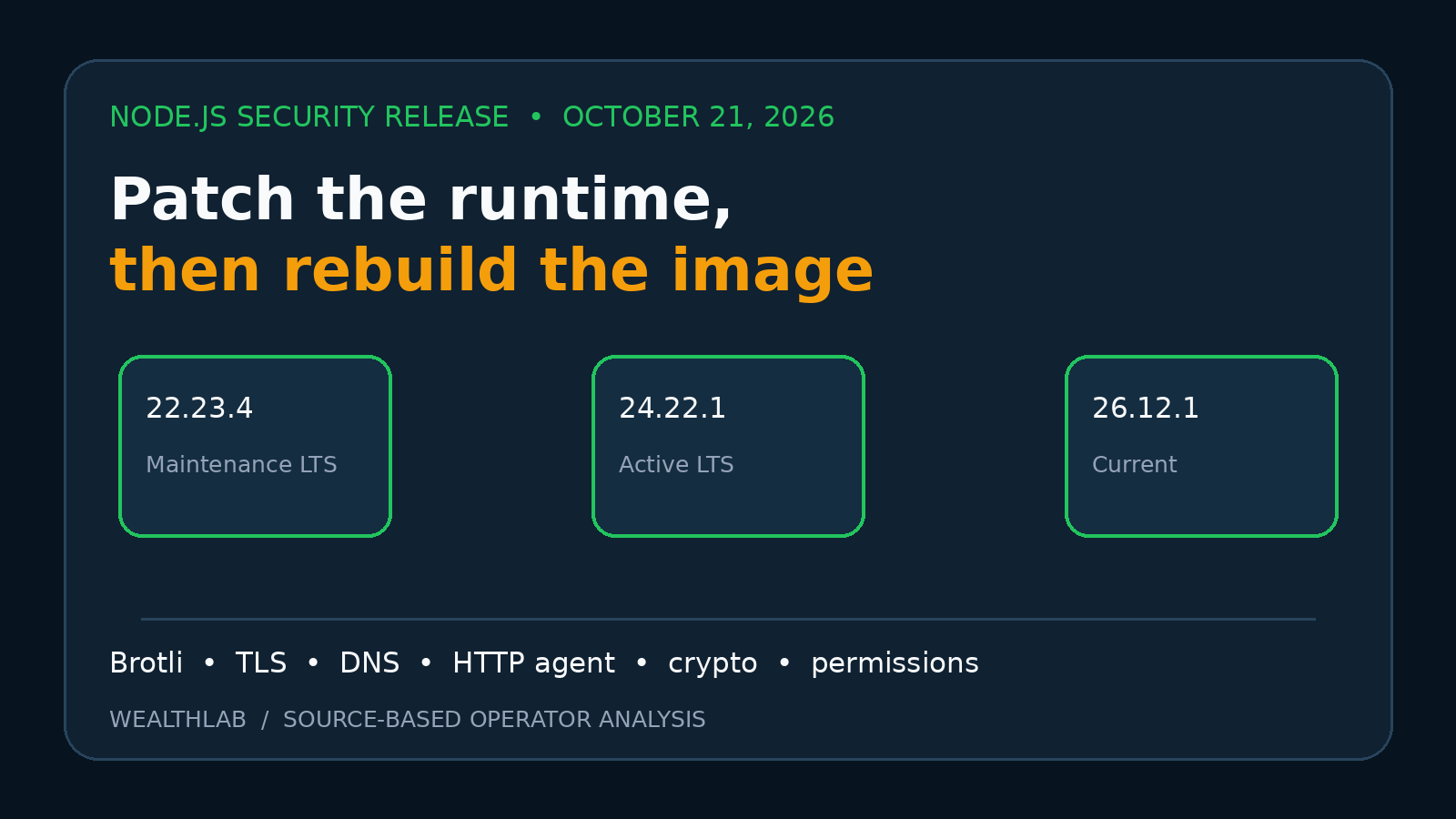
Quick answer: Node.js published security releases on October 21, 2026 for all three supported lines: 22.23.4, 24.22.1, and 26.12.1. The release notes list high-severity fixes affecting Brotli decompression, TLS IP-address handling, and DNS input validation, alongside medium- and low-severity fixes. Self-hosters should update the Node.js runtime, rebuild every affected container image without relying on a stale base-image cache, deploy the new immutable image, and verify the version inside the running container. Updating npm dependencies alone does not replace the bundled runtime.
This is source-based operator analysis, not a hands-on exploit reproduction. WealthLab reviewed the Node.js project’s release notes and release schedule, plus independent security reporting. We did not execute proof-of-concept input, scan a production workload, or test a particular Docker image. Exposure depends on the application’s code paths, inputs, network role, base image, and actual runtime version.
What Node.js released
Node.js published three fixed builds on October 21:
- 22.23.4 “Jod” for the Maintenance LTS 22.x line.
- 24.22.1 “Krypton” for the Active LTS 24.x line.
- 26.12.1 for the Current 26.x line.
The project labels several changes High severity. All three release lines list CVE-2026-111497 for the bundled Brotli dependency, CVE-2026-105482 for null-byte validation in DNS resolution, and CVE-2026-106069/CVE-2026-106072 for rejecting non-canonical IP addresses in TLS handling. The 24.x and 26.x notes also list CVE-2026-105483, described as a TLS IP-normalization regression.
The notes also include a medium-severity HTTP-agent data-guard fix and a crypto cache reset across snapshots, plus lower-severity permission-model and other line-specific changes. Treat each release note as the authority for its branch: the CVE set is not identical across every line.
Why container operators need to rebuild
A Node.js process uses the runtime binary and native dependencies shipped in its image. npm update, a regenerated lockfile, or a package-manager audit does not upgrade that binary. Likewise, restarting a container from the same old image digest starts the same vulnerable runtime again.
A moving tag such as node:24 may point to a refreshed manifest later, but an existing local image and a running container do not change automatically. Build caches can also preserve an older base layer. The operational unit to verify is the deployed image digest and the node --version output inside the live workload—not the intended tag in a Compose file.
Who should prioritize the update
Highest priority: internet-facing services that decompress untrusted Brotli data, proxy or fetch remote content, resolve user-influenced hostnames, or establish TLS connections using addresses derived from external input. Independent reporting highlights the Brotli issue because applications can encounter compressed data through direct decompression APIs or higher-level HTTP clients.
Still update promptly: internal APIs, queues, automation workers, build runners, and self-hosted control panels. “Internal” is not an exemption when a service processes messages, archives, webhooks, package metadata, or responses from systems outside its trust boundary.
Different path: serverless or managed platforms where the provider owns the runtime image. Confirm the provider’s runtime bulletin and redeployment requirements rather than forcing a Docker procedure onto a managed environment.
Inventory before changing production
- Find real runtime versions. Check running containers, CI images, worker pools, one-off jobs, and development images. Do not infer the version solely from
package.jsonor an image tag. - Map supported lines. The Node.js release schedule lists 22.x as Maintenance LTS, 24.x as Active LTS, and 26.x as Current on the publication date. Node.js 20.x and older are outside the supported set; move them to a supported line rather than waiting for a backport.
- Locate all build definitions. Search Dockerfiles, multi-stage builds, CI templates, dev containers, custom base images, and image-copy stages. A final image can contain a Node binary copied from an unexpected builder.
- Record rollback inputs. Preserve the previous immutable image digest, deployment configuration, database backup state, and migration compatibility before replacement.
Container patch checklist
- Select a fixed branch release. Use at least 22.23.4, 24.22.1, or 26.12.1 for the corresponding supported line. Prefer an LTS line for stable production workloads unless the application explicitly requires Current.
- Refresh the base image. Pull the reviewed upstream image and rebuild with base-image refresh enabled. If policy permits, use
docker build --pull --no-cache; otherwise invalidate and audit the specific cached base layers rather than discarding useful application caches blindly. - Pin what you deploy. Resolve the reviewed image to an immutable digest or commit-specific artifact. A tag is convenient input, but it is weak evidence of what reached production.
- Run application tests. Exercise startup, health checks, outbound TLS, DNS-dependent behavior, Brotli response handling, background jobs, and graceful shutdown. A successful
node --versioncheck proves the binary version, not application compatibility. - Deploy progressively. Use a canary or one replica first where the platform allows it. Watch error rate, latency, restart count, TLS failures, DNS errors, and queue lag before replacing the remaining replicas.
- Verify inside the live container. Run
node --version, compare the running image ID/digest with the approved artifact, and confirm the orchestrator did not reuse an old local image. - Remove stale paths deliberately. Retire old CI artifacts and cached images after the rollback window. Do not delete the only known-good rollback image before application checks finish.
Docker Compose example
For an image you build yourself, a safe sequence resembles:
docker compose build --pull app
docker compose up -d app
docker compose ps
docker compose exec -T app node --version
docker compose logs --tail=100 app
These commands are examples, not a universal deployment recipe. Use the actual service name, preserve project-specific Compose files and environment, and run migrations or dependency services according to the application’s documented order. If the workload uses a prebuilt registry image, pull and verify that vendor’s fixed artifact instead of rebuilding unrelated source locally.
Rollback and failure handling
Rollback should restore an application-compatible immutable image and configuration, but security risk changes the decision. If the old image contains an affected runtime and the service processes untrusted data, returning to it may reintroduce the issue. Prefer forward-fixing a compatibility regression, isolating the affected input path, or temporarily restricting exposure while the corrected build is validated.
Database migrations deserve separate treatment. A runtime patch normally should not require schema changes, but an application release bundled into the same image might. Test downgrade compatibility and keep a verified database backup; do not assume rolling back the container automatically rolls back state.
Common false assurances
- “npm audit is clean.” It primarily evaluates dependency metadata, not whether the Node.js executable has these runtime fixes.
- “The container restarted.” Restarting the same digest changes no software.
- “The Dockerfile says Node 24.” That does not establish patch level or what is running.
- “The host is patched.” Container filesystems carry their own userspace runtime and libraries.
- “We do not call zlib directly.” Frameworks and HTTP clients can process compressed responses. Determine actual data paths rather than relying on a source-code keyword search alone.
- “It is only a worker.” Workers often consume attacker-influenced URLs, files, messages, or API responses.
Fit and non-fit cases
This checklist fits Docker and Compose deployments, Kubernetes workloads, CI runners, self-hosted Node.js applications, and custom images where the operator controls the runtime artifact.
Adapt it for distroless images, embedded Node runtimes, Electron applications, platform buildpacks, and vendor appliances. Their update and version-verification mechanisms differ.
It does not prove exploitability. A version inventory can identify an affected runtime, but only application-specific analysis determines whether untrusted input reaches a vulnerable path. Patch supported production branches even when exploitability is uncertain; use that analysis to prioritize rollout and compensating controls, not to manufacture a claim of safety.
Related WealthLab guides
- Docker Engine and containerd security update — separate host runtime patching from the application runtime inside images.
- Docker VPS production checklist — connect image updates with firewalling, backups, monitoring, and recovery.
- n8n security update checklist — apply application-specific version guidance instead of assuming a generic Node rebuild is sufficient.
Evidence boundary and sources
Sources checked October 26, 2026:
- Node.js 22.23.4 release notes, October 21, 2026 — fixed Maintenance LTS version and branch-specific CVE list.
- Node.js 24.22.1 release notes, October 21, 2026 — fixed Active LTS version and branch-specific CVE list.
- Node.js 26.12.1 release notes, October 21, 2026 — fixed Current version and branch-specific CVE list.
- Node.js Release Working Group schedule, checked October 26, 2026 — lifecycle status and support boundary.
- The Hacker News independent report, October 2026 — corroboration and practical Brotli input paths; exact fixed versions remain sourced to Node.js.
No exploit, production scan, image rebuild, or application compatibility test was performed for this article. Release status and images may change after publication; verify the current Node.js notes and your image vendor’s manifest before deployment.
This analysis is non-commercial and contains no affiliate links.