GitHub Copilot SDK Server Authentication: Operator Checklist
GitHub Apps can now authenticate Copilot SDK services without a user session. Review permissions, token handling, access policy, and rollback first.
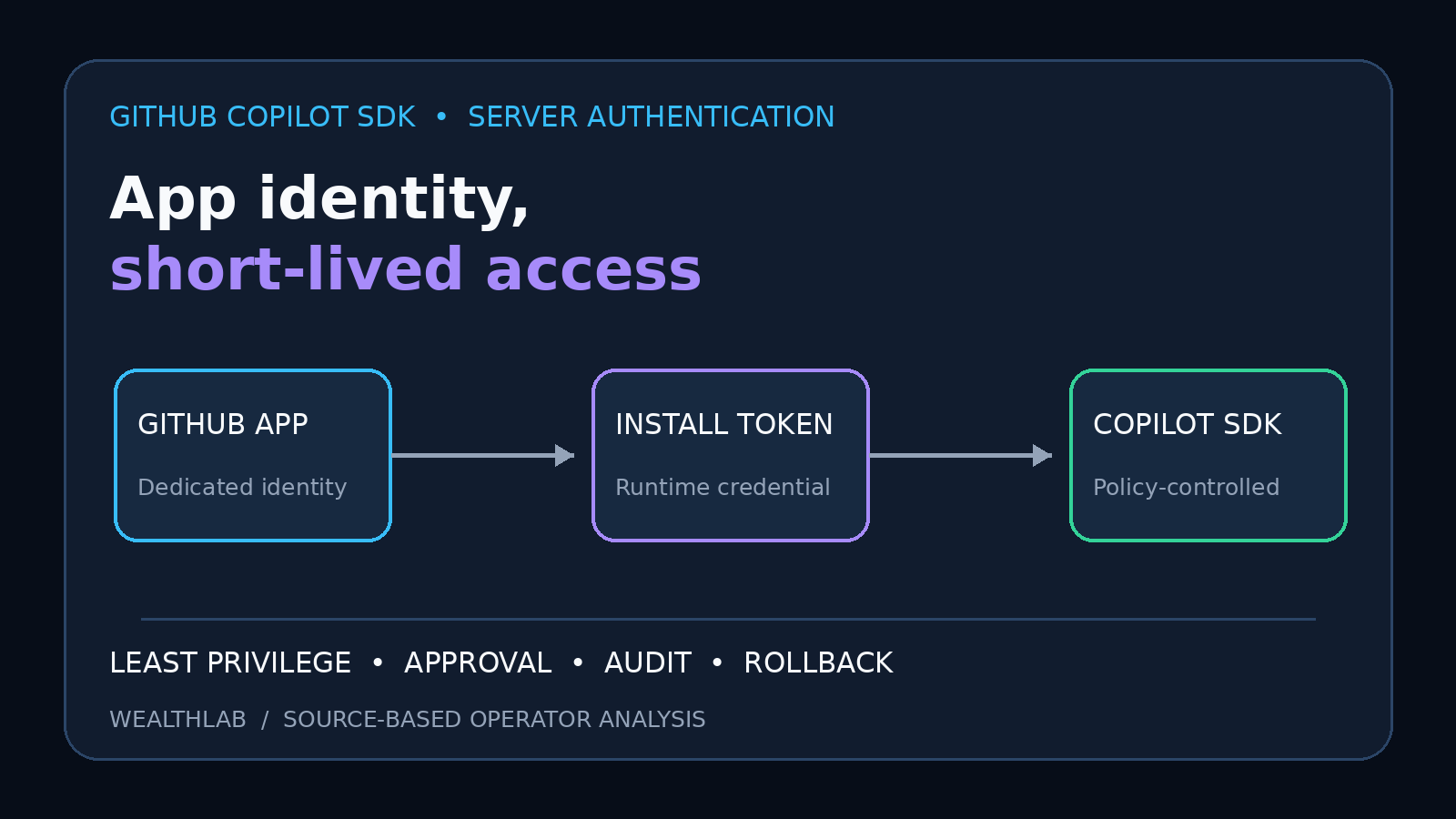
Quick answer: GitHub announced server-to-server authentication for the GitHub Copilot SDK in public preview on October 27, 2026. A backend service can now use a GitHub App installation access token with the app's client ID instead of borrowing a developer's interactive Copilot login. That is a better identity boundary for unattended services, but it is not a blanket authorization: the app needs the Copilot Requests permission, an organization must grant that app Copilot access, and operators still need least privilege, secret rotation, request auditing, and a tested rollback.
This is source-based operator analysis. WealthLab reviewed GitHub's dated changelog, Copilot SDK authentication and organization-access documentation, the SDK repository guidance, and GitHub's general GitHub App token documentation. We did not register an app, obtain a Copilot token, or run a production SDK request.
What GitHub changed
The Copilot SDK previously centered on user authentication. GitHub's new server-to-server path is intended for services such as CI/CD automation, internal developer platforms, and backend agents that run without a person present. The application authenticates as a GitHub App installation and supplies both an installation access token and the app's client_id to the SDK.
GitHub documents the feature as a public preview. Treat that label as an operational constraint: interfaces, availability, and policy behavior can change before general availability. Do not build an irreversible dependency without a version pin, compatibility test, failure mode, and fallback.
The important boundary is split across three layers:
- GitHub App registration: identifies the application and declares its permissions.
- App installation: determines which organization or account installed the app and which repository resources it can reach.
- Copilot organization policy: an organization owner must separately grant the app access to Copilot. Installing the app alone does not grant Copilot use.
Who is affected
Directly affected: teams building unattended Copilot SDK services, CI jobs, internal portals, coding-agent gateways, or multi-user backend integrations. Platform and security teams need to review the app registration, installation scope, Copilot policy, token broker, and logs as one system.
Indirectly affected: organization owners and Copilot administrators. They now have another application identity that can consume Copilot requests, so app approval and offboarding belong in the same governance process as user access and other privileged GitHub Apps.
Not affected by default: ordinary interactive Copilot users and client-side SDK experiments that still authenticate as a person. A service-to-service flow should not replace user identity when a workflow needs the person's own authorization, attribution, or consent.
The permission and access model
GitHub's Copilot documentation requires the GitHub App to request the organization-level Copilot Requests permission with read or write access. The organization owner then reviews the app under the organization's Copilot settings and grants access. GitHub's SDK guidance also requires the app client ID alongside the installation token so Copilot can associate the request with the intended application.
Do not confuse the client ID with a secret. It identifies the app; the private key and generated installation tokens are sensitive. GitHub's general App documentation recommends using the built-in GITHUB_TOKEN in Actions when it is sufficient and using a GitHub App when the workflow needs additional organization or repository reach. That is a useful least-privilege test before adopting this flow.
Repository permissions and Copilot Requests solve different problems. Copilot access does not automatically justify contents, pull-request, issue, workflow, or administration permissions. Add only the resource permissions required by the concrete workflow, and document why each write permission exists.
Operator checklist before enabling it
- Define the unattended job. Record the exact inputs, repositories, models or SDK operations, output destinations, and permitted side effects. A vague “agent backend” is not a reviewable scope.
- Prefer the narrowest native credential. In GitHub Actions, first determine whether the repository-scoped
GITHUB_TOKENis enough. Introduce a GitHub App only when the required boundary genuinely extends beyond it or the Copilot server flow requires the app identity. - Create a dedicated app identity. Do not reuse a broad administrative app just because it already has a private key. Separate identity makes approval, logging, revocation, and incident containment clearer.
- Minimize App permissions. Grant Copilot Requests at the level required by the documented flow, then add only the repository or organization permissions needed for the service's actual side effects.
- Restrict the installation. Select only required repositories where GitHub supports repository selection. Recheck scope when repositories move, are renamed, or become archived.
- Protect the private key. Store it in the platform's secret manager, never in source, images, logs, issue text, or agent context. Limit which runtime can request installation tokens.
- Mint tokens at runtime. Use short-lived installation access tokens rather than caching a long-lived user token. Do not print tokens or pass them in command-line arguments that may appear in process listings.
- Bind the correct client ID. Keep the app client ID as reviewed configuration and confirm it matches the app installation that produced the token. Do not substitute the numeric app ID.
- Grant Copilot access deliberately. Have an organization owner review the app in Copilot settings. Record the approver, business purpose, review date, and offboarding owner.
- Separate generation from execution. Model output should not automatically gain shell, merge, deployment, or infrastructure authority. Validate structured output and require policy checks or human approval for higher-impact actions.
- Test failure paths. Exercise expired tokens, revoked Copilot access, removed app installation, missing repository permissions, rate limits, malformed output, and unavailable SDK services. Fail closed for writes.
- Log identity and effect. Correlate the app installation, repository, workflow run or service request, SDK operation, resulting GitHub mutation, and approval without logging prompts or secrets unnecessarily.
Deployment pattern
A defensible architecture keeps the GitHub App private key in a small token-broker component or trusted CI secret store. The runtime requests an installation token only when a job starts, supplies the token and reviewed client ID to the Copilot SDK, and discards the token when the job ends. A separate policy layer decides whether generated output may create a branch, open a pull request, or trigger a deployment.
For a multi-tenant internal service, do not share one installation token across organizations. Resolve the installation from the authenticated tenant, verify that the requested repository belongs to that installation, mint a token for that installation, and keep tenant-specific logs and quotas. The SDK credential should never become an ambient credential available to unrelated tools.
Rollback and incident response
- Disable new jobs or switch the feature flag back to the prior user-mediated path.
- Remove the app's Copilot access in organization settings to stop Copilot use without waiting for a deployment.
- Revoke or uninstall the GitHub App installation if repository access is also at risk.
- Rotate the app private key if it may have been exposed; removing Copilot access alone does not repair a leaked key.
- Review GitHub audit and service logs for token creation, installation changes, affected repositories, and resulting mutations.
- Re-enable only with a new key, corrected permissions, and a replay of negative tests.
Document which control is fastest in your environment. Organization Copilot access, app installation, and runtime deployment are separate switches; an incident procedure should name all three.
Fit and non-fit cases
Good fit: a reviewed backend service that needs Copilot SDK capabilities without a person maintaining an interactive session; a CI or internal platform workflow with a dedicated app, narrow repository scope, and observable side effects.
Use extra controls: services that can change code, merge pull requests, alter workflows, access private repositories, or trigger deployments. Add branch protection, environment approvals, signed artifacts, workload isolation, and independent policy checks.
Non-fit: a desktop feature that needs the current user's identity; a prototype that would store a private key on an unmanaged workstation; a shared “automation” app with broad organization administration; or a workflow that sends untrusted repository text directly into an agent with unrestricted tools.
What this preview does not prove
- It does not make generated code correct, secure, licensed for a particular use, or ready to execute.
- It does not make a GitHub App installation token harmless; the token carries the app installation's granted permissions.
- It does not replace repository protections, human review, workload isolation, secret scanning, or audit-log retention.
- It does not establish stable general-availability behavior. Public-preview consumers should track documentation and SDK release changes.
- It does not prove cost, latency, throughput, model quality, or compatibility for a particular service. WealthLab performed no benchmark.
Evidence boundary and sources
Sources checked October 28, 2026. GitHub is the primary source for feature status, required Copilot permission, SDK configuration, organization approval, and general GitHub App token handling. The changelog and implementation documentation are separate GitHub publications rather than independent third-party corroboration. WealthLab found no substantive independent technical review of this one-day-old preview, so we do not present vendor claims as independently tested.
- GitHub Changelog, October 27, 2026: Copilot supports server-to-server authentication — announcement date, public-preview status, intended service workloads, and required app permission.
- GitHub Docs: Use server-to-server authentication with the Copilot SDK — app setup, installation token, client ID, and SDK configuration.
- GitHub Docs: Manage GitHub App access to Copilot — organization-owner approval and removal path.
- GitHub Copilot SDK repository: server-to-server tokens — repository-level implementation guidance.
- GitHub Docs: GitHub App authentication in Actions — private-key storage, installation token creation, and guidance to prefer
GITHUB_TOKENwhen sufficient.
No GitHub App was registered, no organization policy was changed, no private key or installation token was created, and no Copilot SDK request was executed. This article contains no affiliate links.
Related WealthLab guides
- GitHub Copilot local sandboxing checklist — keep authentication separate from runtime isolation and tool permissions.
- GitHub Copilot global-default policy audit — review organization-wide policy changes and inheritance.
- Agent Skills supply-chain checklist — review portable agent instructions, scripts, and runtime access.
- Claude Code plugin pin-bypass checklist — apply version and provenance controls to agent extensions.