VPS Firewall Setup for Docker Apps: A Safe Guide
Secure a Docker VPS with provider, host, and Docker-aware firewall controls while keeping databases and admin ports private.
This troubleshooting guide contains no affiliate links. Its configuration-rendering experiment uses synthetic data, not production credentials or a provider benchmark.
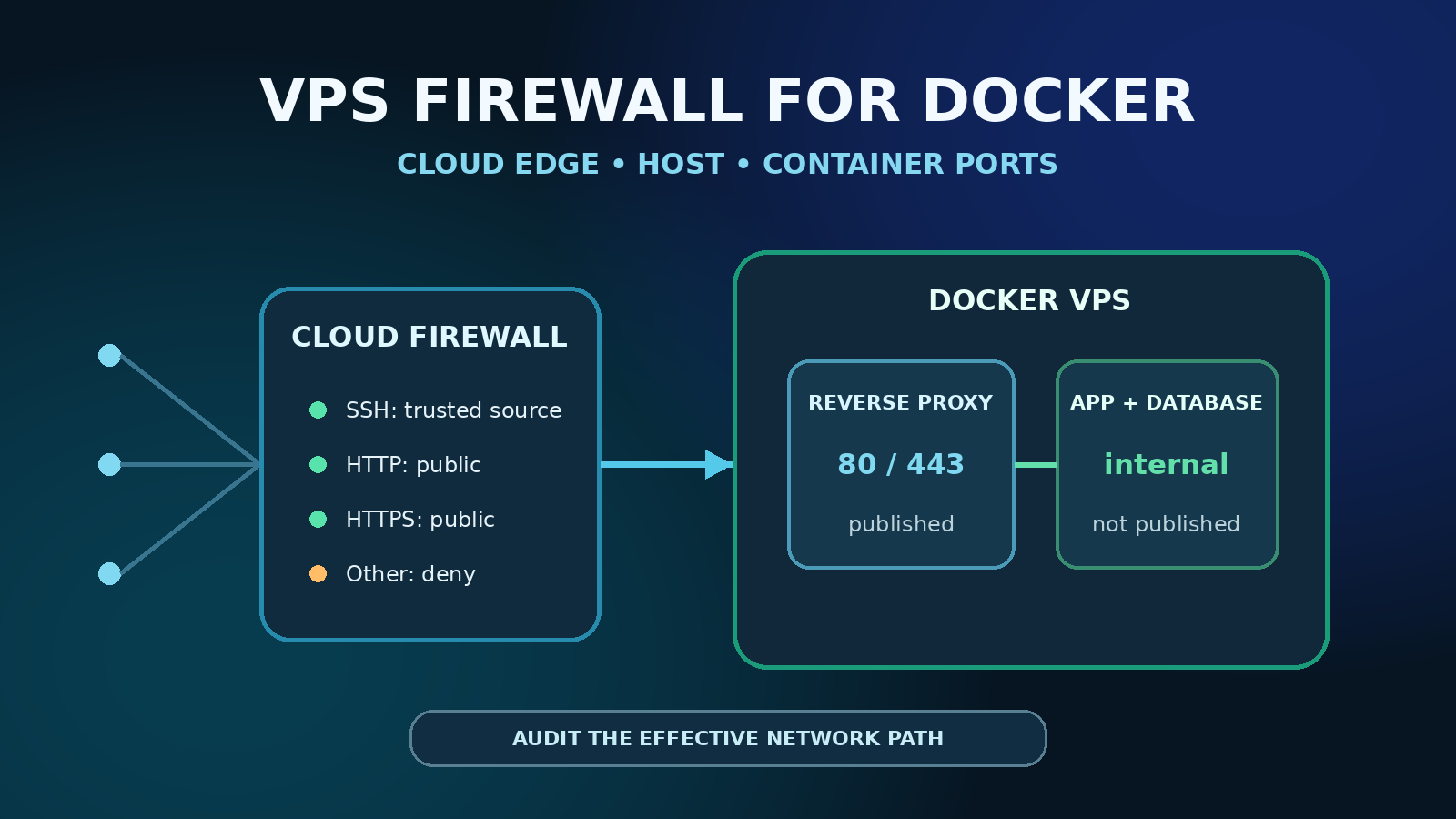
A secure Docker VPS should expose only the reverse proxy on TCP 80/443 and a deliberately restricted administration path. Application, database, cache, queue, metrics, and Docker API ports should normally stay on private Docker networks or bind to loopback. Use a provider firewall as the outer gate, a host firewall for host services, and Docker-aware filtering for published container ports. Do not assume UFW alone controls a port published by Docker.
This guide uses an Ubuntu-style host and Docker Compose, but it is a decision framework rather than a universal ruleset. Network interfaces, IPv4/IPv6 use, VPNs, reverse proxies, orchestration, provider controls, and Docker firewall backends differ. Keep a provider console open, preserve an existing SSH session, and prepare a rollback before changing a remote firewall.
Quick answer: the minimum safe model
- At the cloud edge: allow TCP 80 and 443 from the internet; allow SSH only from trusted addresses or a private access network when practical.
- On the host: default-deny unsolicited inbound traffic, preserve established traffic, and allow only required host services.
- In Compose: publish only services that must receive host traffic. Bind administrative interfaces to
127.0.0.1or do not publish them at all. - For Docker forwarding: understand Docker's generated rules. With the iptables backend, place supported user policy in
DOCKER-USERrather than editing Docker-managed chains. - After deployment: test from an external network and inspect both IPv4 and IPv6. A configuration file is not proof of the effective exposure.
Why a Docker VPS needs layered filtering
A packet can encounter several independent controls before it reaches a container. The provider firewall filters traffic before the virtual machine. The host firewall filters traffic terminating on or forwarding through the guest. Docker then creates rules for bridge networking, network isolation, NAT, and port publishing. Finally, the reverse proxy and application enforce TLS, host routing, and authentication.
These layers are complementary, not interchangeable. A cloud firewall cannot protect a service reachable through another permitted path inside the host. A reverse proxy does not hide a database that Compose also publishes on every interface. A host INPUT policy may not behave as expected for Docker-forwarded traffic. Record which layer owns each decision so operators do not create conflicting rules.
Start with an exposure inventory
Before changing anything, collect read-only evidence. Run these commands from a trusted administrative session:
sudo ss -lntup
docker ps --format 'table {{.Names}}	{{.Ports}}'
docker compose config --quiet
docker network ls
sudo ufw status verbose
sudo iptables -S
sudo iptables -S DOCKER-USER
sudo ip6tables -S
If the host uses Docker's nftables backend, inspect the nftables ruleset and follow the corresponding Docker documentation rather than copying iptables commands. Also inventory provider firewall groups, assigned instances or tags, reserved/public addresses, load balancers, private interfaces, VPN interfaces, and DNS records.
For every listening or published port, write down the service, host bind address, protocol, legitimate source, authentication layer, and owner. Investigate any 0.0.0.0:PORT or [::]:PORT entry you did not intentionally approve.
Inspect Compose without leaking credentials
Do not paste a full docker compose config result into an issue, chat, or public log. Compose resolves the application model, including environment values. Use --quiet for validation; it does not show the port inventory. For port inspection, capture JSON privately and print only the fields needed:
set -o pipefail
docker compose config --format json | python3 -c '
import json, sys
model = json.load(sys.stdin)
for name, service in model.get("services", {}).items():
    print(name, json.dumps({key: service[key] for key in
        ("ports", "expose", "network_mode") if key in service}))
'
Run this in Bash from the intended Compose project with the same override files and profiles used for deployment. Review service names and addresses before sharing even this limited output. Do not enable shell tracing or save the unfiltered JSON to a shared log. Validation failures can still produce diagnostics that need private review. Missing ports does not prove isolation: host networking, direct routing, other containers, and upstream proxies require separate inspection.
Observed synthetic render: September 28, 2026
We ran a configuration-only experiment with Docker Compose 5.5.1. A synthetic admin service contained a deliberately fake environment value and 127.0.0.1:19000:9000; a second service had only expose: [3306]. The full JSON render contained the fake value, while config --quiet produced no standard output. The normalized admin mapping retained host IP 127.0.0.1, published port 19000, target 9000, and TCP; the database had no published-port entry.
To reproduce safely, create a separate temporary Compose project using only dummy values and these mappings, run both forms of config, and compare them locally. Do not run up or substitute real credentials. Our test removed its temporary directory afterward. This tests configuration rendering only: no containers were started, no firewall rules changed, and no internet reachability, IPv6 policy, or UFW bypass was tested. A clean render is not a security certification.
The official Compose config reference was rechecked September 28, 2026 for variable resolution, JSON rendering, and quiet validation.
Design the allowed traffic before applying rules
A common single-host web stack has a small public surface:
- TCP 80: optional HTTP redirect and ACME challenge path.
- TCP 443: public HTTPS to the reverse proxy.
- TCP 22: SSH from a trusted IP range, VPN, bastion, or other deliberate administrative path.
- ICMP: preserve enough diagnostic and path-MTU behavior for the network design; do not blindly block all ICMP.
- Everything else inbound: deny unless a documented workload requires it.
Database ports such as 3306 or 5432, Redis 6379, application development ports, dashboards, exporters, Docker 2375/2376, and container management UIs should not be public by default. If a service must be reached by another server, prefer a private network or authenticated overlay and restrict both source and destination.
Configure the provider firewall
Attach the firewall to the correct instance or stable tag before treating it as protection. Configure IPv4 and IPv6 intentionally. A rule that covers only IPv4 does not prove the IPv6 address is filtered.
DigitalOcean Cloud Firewall
DigitalOcean documents Cloud Firewalls as network-based, stateful controls separate from software such as UFW on the Droplet. Rules at one layer are not reflected at the other. The documented service denies traffic that matches no rule, while attached firewalls and deny/allow precedence must be reviewed as a complete set.
For a public Docker web host, allow HTTP/HTTPS from the intended public sources and restrict SSH to a trusted administrative source. Keep database and internal service ports absent. Confirm the firewall is attached to the intended Droplet or tag, then test rather than assuming the dashboard state matches the packet path.
Vultr Firewall
Vultr Firewall groups contain inbound rules based on protocol, port, and source and must be associated with the intended compute instance. Use explicit source ranges for administration and only the public service ports required by the application. Review both IP families and the instance association after every rebuild or migration.
Provider controls are valuable even when the host firewall is correct: they reduce traffic reaching the guest and provide a recovery layer if a host rule changes. They do not replace host and container-network controls.
Configure UFW without locking yourself out
Ubuntu documents UFW as its default firewall frontend and notes that it is disabled by default. For a host without Docker, a basic sequence might preserve SSH, set defaults, permit HTTP/HTTPS, and then enable UFW. On a remote server, do not run it mechanically:
sudo ufw status verbose
sudo ufw allow proto tcp from ADMIN_CIDR to any port 22
sudo ufw default deny incoming
sudo ufw default allow outgoing
sudo ufw allow 80/tcp
sudo ufw allow 443/tcp
sudo ufw --dry-run enable
Replace ADMIN_CIDR with a verified source. If your address changes, use a VPN, bastion, console, or another maintainable design. Validate the generated rules, keep the current session open, enable the firewall, and open a second session before disconnecting. If SSH runs on another port, update both the service and every filtering layer first.
Docker caveat: Docker's documentation says published container traffic is diverted through NAT before the INPUT and OUTPUT chains commonly used by UFW, effectively bypassing the policy users expect. UFW status can therefore look restrictive while a Docker-published service is reachable.
Publish container ports deliberately
Docker documents that a mapping without a host address binds to all host addresses. Compare these Compose patterns:
services:
  proxy:
    ports:
      - "80:80"
      - "443:443"

  admin:
    ports:
      - "127.0.0.1:9000:9000"

  database:
    expose:
      - "3306"
In the normal bridge/NAT setup, the proxy mapping listens on host interfaces and the administrative mapping binds to host loopback; the database has no host port publication. For the database, omitting both ports and expose can also be valid because containers on the same user-defined network can address its container port directly; expose is documentation, not an internet firewall.
Loopback has a version caveat: Docker's port-publishing documentation, rechecked September 28, 2026, warns that releases older than 28.0.0 can allow hosts on the same layer-2 network to reach localhost-published ports. Check the Engine version with docker version, not the Compose plugin version. Upgrade affected Engines and review direct-routing and gateway settings; do not treat a loopback mapping alone as proof of complete network isolation.
Prefer separate frontend and backend networks, attach only the required services, and avoid network_mode: host unless the application genuinely requires it. Host networking changes the boundary because the process uses the host network namespace.
Use Docker-aware filtering
Docker creates its own chains for bridge networks. With the iptables backend, Docker documents DOCKER-USER as the place for user rules processed before Docker's forwarding chains. Rules merely appended to the host FORWARD chain may run too late. Do not edit or flush Docker-managed chains.
A production policy often needs to accept established replies, allow required sources and ports, and reject other new traffic entering through the public interface. The correct rule depends on the external interface, original destination after DNAT, published host address, Docker version, IP family, other forwarding duties, and whether the host is also a router. Docker notes that matching the original destination in DOCKER-USER requires conntrack and may have a performance cost.
Because a generic drop command can cut off legitimate forwarding or expose a false sense of safety, build and test the rule on a staging host that matches production. Persist it through the operating system's supported mechanism, document rollback, and verify it survives both Docker and host restarts.
Do not disable Docker firewall management casually
Docker warns that setting its iptables or ip6tables options to false is not appropriate for most users and is likely to break bridge networking. Without equivalent replacement rules, container internet access and local-network exposure can behave unexpectedly. Keep Docker's rule management enabled unless you own and test the full replacement design.
Protect SSH and the Docker control plane
- Use key-based SSH, disable unused accounts, and restrict source addresses where operationally sustainable.
- Keep a provider console or recovery method available before tightening remote access.
- Do not expose an unauthenticated Docker TCP socket. Control of the Docker daemon is effectively host-level administrative power.
- Treat membership in the
dockergroup as privileged access. - Place web dashboards behind strong authentication and preferably a private access layer; binding to loopback is safer than publishing to every interface.
Verify from outside the VPS
Local tests cannot prove internet exposure. From a system you control on a different network, test only your own server and the ports you expect:
curl -I http://example.com
curl -I https://example.com
nc -vz example.com 22
nc -vz example.com 3306
The intended result depends on your policy: HTTPS should answer, HTTP may redirect, SSH should be reachable only from approved sources, and the database should time out or refuse external access. Repeat with IPv6 when DNS or the server publishes an AAAA record. Do not use a broad third-party scan against systems you do not own.
On the server, correlate the test with ss, container port mappings, provider firewall state, host counters, and application logs. Reboot during a maintenance window and repeat the checks to prove persistence.
Troubleshooting
UFW says deny, but the container port is reachable
Check docker ps, the resolved Compose configuration, host bind addresses, and Docker's NAT/forwarding rules. A Docker-published port may bypass the UFW path you expected. Remove an unnecessary mapping, bind it to loopback, or implement tested Docker-aware filtering.
HTTPS works locally but not publicly
Verify DNS, provider firewall attachment, IPv4 and IPv6 rules, host listeners, the Compose mapping, reverse-proxy logs, and upstream proxy settings. Test the origin and public path separately.
SSH stopped working after firewall changes
Do not close the remaining working session. Inspect the actual SSH port and source restriction, restore the required provider and host rules, and use the provider console if necessary. This is why rule changes need a rollback path.
Rules disappear after reboot
Identify which component owns persistence: provider control plane, UFW, an iptables persistence service, a systemd unit, or another firewall manager. Avoid having several tools rewrite the same chain without a documented order.
IPv4 is filtered but IPv6 is open
Audit AAAA records, assigned IPv6 addresses, Docker IPv6 configuration, provider IPv6 rules, and host IPv6 policy. Apply an intentional dual-stack design or remove unused IPv6 exposure rather than assuming IPv4 policy carries over.
Production launch checklist
- Inventory host listeners, Compose mappings, Docker networks, both IP families, and provider rules.
- Document the legitimate source and owner for every open port.
- Restrict SSH before exposing the application, while preserving console recovery.
- Publish only the reverse proxy publicly; keep data and admin services internal or loopback-bound.
- Use a provider firewall and host policy without assuming either controls Docker forwarding by itself.
- Test externally from approved and unapproved source networks.
- Verify HTTP, HTTPS, SSH, database, admin, and monitoring behavior after a restart.
- Store firewall configuration and rollback instructions with the deployment runbook.
- Repeat the exposure audit after every Compose or networking change.
Apply this to your existing VPS
A firewall design is portable across reputable VPS providers. Choose by workload resources, region, network requirements, recovery options, support boundary, and operator familiarity—not by an unsupported security ranking. DigitalOcean documents a separate Cloud Firewall layer for Droplets, while Vultr documents Firewall groups and source-based inbound rules for attached instances.
You do not need to buy or migrate a server to audit its network exposure. Correct unnecessary port publications and verify the effective traffic path on the server you already operate. Consider a provider change only if its controls or recovery options cannot meet your requirements.
For the broader decision, read the DigitalOcean vs Vultr comparison and Best VPS for Docker Apps guide. Use the Docker VPS production checklist for secrets, backups, health checks, updates, and monitoring beyond the network perimeter.
FAQ
Is a cloud firewall enough for Docker?
No single layer is enough. A provider firewall is a strong outer control, but you still need intentional Compose mappings, host-service policy, private container networks, and application authentication. Test the complete path.
Should I open a database port temporarily?
Prefer an SSH tunnel, VPN, private network, or a short-lived authenticated maintenance path. If a public rule is unavoidable, constrain it to a verified source, set a removal deadline, monitor it, and remove it immediately afterward.
Does expose publish a Compose service to the internet?
No. Compose expose describes container ports without publishing them to the host. Internet reachability depends on networking, routing, and filtering, so still verify the effective path.
Can I use only UFW?
Not as proof that Docker-published ports are restricted. UFW remains useful for host services, but Docker's documentation explicitly warns that published container traffic can bypass the path UFW normally controls.
Should I add rules directly to Docker's chains?
Do not modify Docker-managed chains. With the iptables backend, Docker provides DOCKER-USER for user filtering before its forwarding chains. Follow current backend-specific documentation and test persistence.
If the remote host will run an AI agent, use the isolated Hermes Agent Linux installation guide to inspect, test, and clean up the installer before configuring credentials or a gateway.
Sources checked
- Docker packet filtering and firewalls
- Docker with iptables and the DOCKER-USER chain
- Docker port publishing and mapping
- Ubuntu Server firewall documentation
- DigitalOcean Cloud Firewall rule documentation
- Vultr Firewall rule documentation
Official sources reviewed September 9, 2026. Docker networking and provider controls change; verify current documentation and test on your exact operating system, Docker release, firewall backend, network interfaces, and IP families before production use.