How to Install Hermes Agent on Linux Safely
Install Hermes Agent on Linux with an inspect-first workflow, isolated validation, exact observed results, troubleshooting, cleanup, and evidence limits.
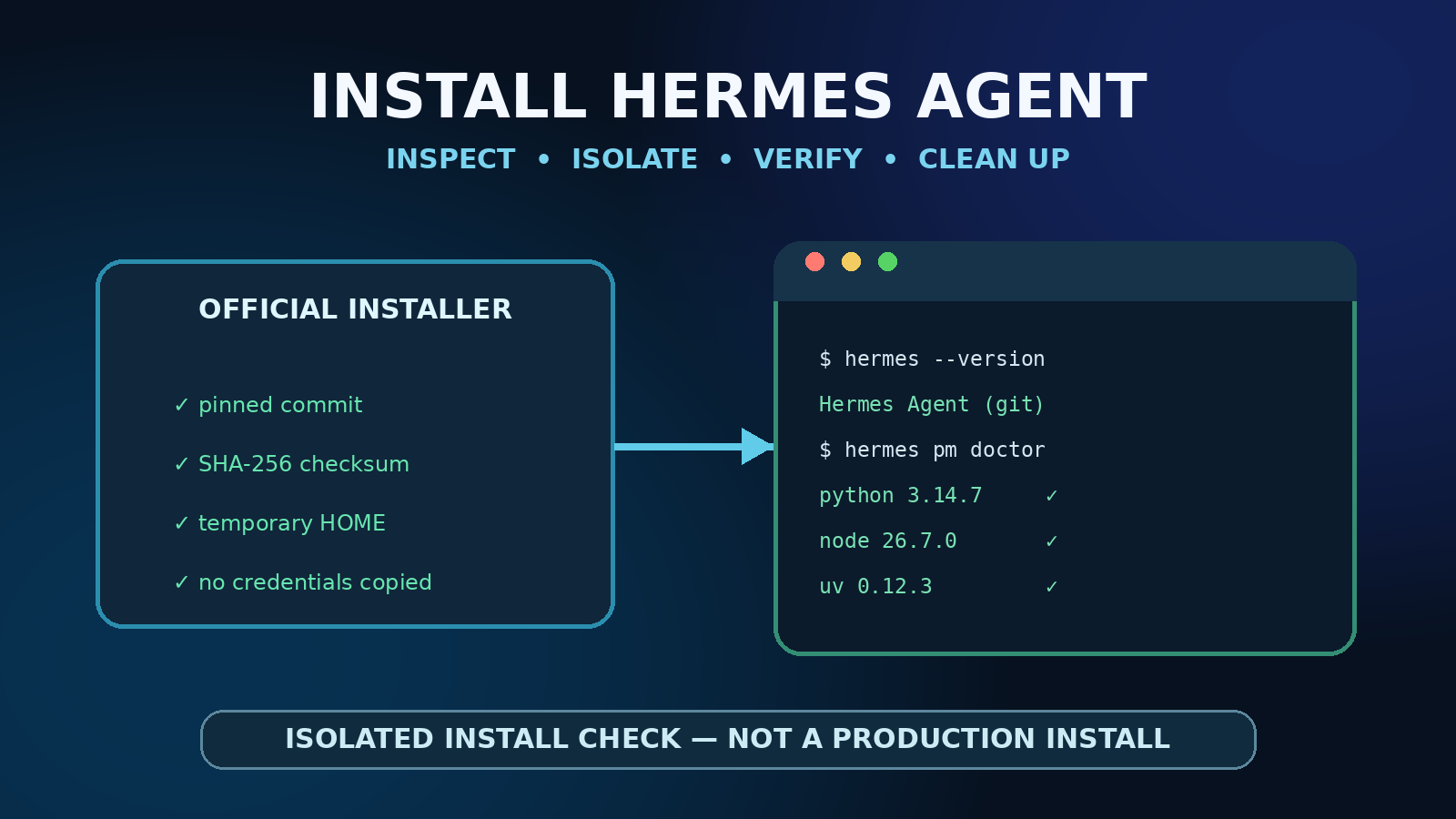
This guide contains no affiliate links. The installation evidence below comes from a disposable local test environment, not WealthLab's active Hermes configuration, a production server, a GPU benchmark, or a provider comparison.
On a supported Linux system, Hermes Agent's official command-line installer can prepare its own pinned Python and tools; you do not need to force the application into the system Python. The fastest official command is short, but a cautious operator should download and inspect the installer first, choose an isolated data directory when testing, and verify the installed launcher with the same environment variables used during installation.
This walkthrough adds the parts a one-line quick start cannot: what the script changes, a reproducible isolated-path validation from October 5, 2026, expected versus observed results, a real verification mistake, failure diagnosis, cleanup, and clear evidence boundaries.
Quick answer
- Confirm that your platform is supported and that Git, curl, tar, and SHA-256 utilities are available.
- Download the installer to a file, inspect it, and record its checksum rather than piping unseen code directly into a shell.
- For a normal install, run it as the intended user. For evaluation, redirect
HOME,HERMES_HOME, the source checkout, and XDG directories to one disposable directory. - Keep those variables set while checking
hermes --version,hermes --help, andhermes pm doctor. - Run interactive setup only after you decide to keep the installation. Do not copy existing credentials into a temporary test.
What the official source installer does
Hermes' current Linux/macOS/WSL2 installer clones the official repository, downloads a SHA-256-verified pinned uv build, prepares a managed Python environment from committed locks, builds the command and web interface, syncs bundled skills, prepares the Hermes data directory, and publishes a launcher. Interactive runs can continue into provider and gateway setup.
The source checkout and user data are separate. By default on POSIX, code lives under ~/.hermes/hermes-agent/, the launcher is ~/.local/bin/hermes, and user data lives under ~/.hermes/. HERMES_HOME changes the data root; --dir changes the source checkout. That separation is useful for testing, but it also means both paths must remain coherent when you invoke the temporary launcher.
Current first-party source installations use a managed Python 3.14 runtime. The broader Python range in project metadata exists partly so older installations can run the updater; it is not a reason to install Hermes with an arbitrary system pip. The official platform matrix lists Linux x86_64 and aarch64 as Tier 1 when installed with install.sh. PyPI and Homebrew installs are explicitly unsupported.
Prerequisites and boundaries
- Supported host: current Linux or WSL2 on x86_64/aarch64; a glibc, systemd, FHS-style distribution is the best-supported Linux shape.
- Bootstrap tools: Git, curl, tar, and a SHA-256 utility. Source builds may also need native compiler or platform libraries.
- Network: repository, Python/tool, package, and frontend dependency downloads require outbound access.
- Privileges: install as the intended user. Do not run as root merely to avoid a permissions problem.
- Secrets: installation does not require copying an API key into a disposable validation. Provider configuration is a later step.
- Disk: allow several gigabytes for the checkout, managed tools, Python environment, package caches, and build products. Our intentionally browser-free test occupied about 2.44 GB (2.27 GiB) before cleanup.
Safer normal installation: inspect before execution
The official quick install is curl -fsSL https://hermes-agent.nousresearch.com/install.sh | bash. It is convenient, but it combines download and execution. The following form leaves an inspectable file and stops if download or shell parsing fails:
set -euo pipefail
work="$(mktemp -d)"
trap 'rm -rf -- "$work"' EXIT
installer="$work/install.sh"

curl -fsSL https://hermes-agent.nousresearch.com/install.sh -o "$installer"
sha256sum "$installer"
bash -n "$installer"
less "$installer"

# Run only after you are satisfied with the source and destination.
bash "$installer"
A checksum records exactly what you reviewed; it does not prove the file is trustworthy by itself. Compare the source URL, repository destination, pinned artifact checks, write locations, shell-profile edits, and commands with current official documentation. The installer changes over time, so do not reuse the October checksum from this article as a permanent allowlist.
After a normal installation, reload the shell if needed, then run:
hermes --version
hermes --help
hermes pm doctor
hermes setup
hermes pm doctor checks managed tool state. A question mark beside an optional tool does not automatically mean the core installation failed; interpret it against what you chose to install.
Reproduce an isolated-path installation test
This validation avoids the active ~/.hermes directory, normal launcher, shell files, credentials, and gateway. It skips optional agent-browser/Chromium and computer-use downloads. The environment is cleared before invoking the installer, but the process still runs as your user and can access what that user can access: path redirection is not a security sandbox. Use a disposable account, container, or VM when you need a stronger boundary.
set -euo pipefail
base="$(cd -- "${TMPDIR:-$HOME/.cache}" && pwd -P)"
run_root="$(mktemp -d "$base/hermes-install-check.XXXXXXXX")"
cleanup() {
  case "$run_root" in
    "$base"/hermes-install-check.*) rm -rf -- "$run_root" ;;
    *) printf 'refusing unexpected cleanup target
' >&2; return 1 ;;
  esac
}
trap cleanup EXIT

mkdir -p "$run_root/home" "$run_root/tmp"   "$run_root/xdg-config" "$run_root/xdg-cache"   "$run_root/xdg-data" "$run_root/xdg-state"
installer="$run_root/install.sh"
curl -fsSL https://hermes-agent.nousresearch.com/install.sh -o "$installer"
chmod 700 "$installer"
bash -n "$installer"
sha256sum "$installer"

commit="$(git ls-remote https://github.com/NousResearch/hermes-agent.git   refs/heads/main | cut -f1)"
[[ "$commit" =~ ^[0-9a-f]{40}$ ]]

common_env=(
  env -i
  HOME="$run_root/home"
  USER="${USER:-hermes-test}"
  LOGNAME="${LOGNAME:-hermes-test}"
  SHELL=/bin/bash
  PATH=/usr/local/sbin:/usr/local/bin:/usr/sbin:/usr/bin:/sbin:/bin
  TMPDIR="$run_root/tmp"
  HERMES_HOME="$run_root/hermes-home"
  XDG_CONFIG_HOME="$run_root/xdg-config"
  XDG_CACHE_HOME="$run_root/xdg-cache"
  XDG_DATA_HOME="$run_root/xdg-data"
  XDG_STATE_HOME="$run_root/xdg-state"
  CI=1 NO_COLOR=1
)

"${common_env[@]}" bash "$installer"   --commit "$commit"   --dir "$run_root/source"   --hermes-home "$run_root/hermes-home"   --non-interactive   --skip-browser   --skip-computer-use   --verbose

launcher="$run_root/home/.local/bin/hermes"
"${common_env[@]}" "$launcher" --version
"${common_env[@]}" "$launcher" --help >/dev/null
"${common_env[@]}" "$launcher" pm doctor

test "$(git -C "$run_root/source" rev-parse HEAD)" = "$commit"
# Exiting this shell triggers cleanup of only the unique generated directory.
Why pin the commit? The installer itself is still fetched from the current official URL, but recording and passing the exact repository commit makes the source checkout reproducible. For longer-lived automation, archive the reviewed installer and its checksum as well. A moving main branch is useful for testing today's path, not for proving a future download is identical.
Why capture the base before changing paths? Cleanup must not be recomputed from a redirected HOME. A unique mktemp directory avoids deleting a pre-existing fixed path, and the guarded EXIT trap handles both success and ordinary command failure. It does not guarantee cleanup after SIGKILL or defend against every hostile same-user filesystem race.
What we tested on October 5, 2026
| Item | Recorded value |
|---|---|
| Host | Ubuntu 24.04-family Linux, kernel 7.0.0-31-generic, x86_64, glibc; no NVIDIA GPU |
| Repository commit | af8839df1038cc026075fb254afa22edc19d911d |
| Installer SHA-256 | e5b8a80332aff53302cb92aa6dad524d8c274f4ac6b2d44f23229f623acd4721 |
| Reported Hermes version | vgit.af8839d (2026.9.24) |
| Managed runtimes/tools | Python 3.14.7, Node 26.7.0, npm 12.0.2, uv 0.12.3, ripgrep 15.2.0, FFmpeg 9.0.1 |
| Options | non-interactive, browser skipped, computer-use skipped, desktop not requested |
| Path separation | temporary HOME, HERMES_HOME, all XDG roots, TMPDIR, source checkout, and launcher; explicit minimal environment; same host user, not a sandbox |
| Validation record | WL-HERMES-INSTALL-20261005-af8839df |
Expected versus observed result
| Check | Expected | Observed |
|---|---|---|
| Installer completion | Exit 0 with a completion receipt pinned to the requested commit | Exit 0 during the successful run from 2026-10-05T00:15:21Z to 00:17:39Z; the checkout was pinned to af8839df…. |
| Source checkout | HEAD equals the requested commit | Matched af8839df… |
| CLI version | Temporary launcher identifies the isolated checkout and managed Python | Reported vgit.af8839d, the expected source directory, Git method, Python 3.14.7, and OpenAI SDK 2.24.0. |
| CLI help | Loads successfully without provider credentials | Exit 0; 230 output lines captured. |
| Package doctor | Core managed tools pass; deliberately skipped optional tools remain absent | Exit 0; Python, Node, npm, uv, ripgrep, and FFmpeg passed. Browser/Chromium and computer-use were not installed as requested. |
| Active state | No change to the existing Hermes config, environment file, auth store, or normal launcher | Before/after SHA-256 fingerprints were identical; secret values were never printed. |
| Cleanup | Only the unique generated directory is removed on ordinary exit | The successful run and two earlier failed harness attempts removed their generated trees; the synthetic safety drill separately passed seven collision, exit-status, and cleanup checks. |
A real verification failure: the harness can be wrong
The installer completed during a diagnostic run, and the temporary launcher, help output, and package doctor all worked. Our wrapper still returned failure because its before/after fingerprint files contained different header labels. The hashes underneath were identical, but a raw file diff correctly treated the labels as a change.
We removed labels from the compared snapshot payload and reran the entire installation from a fresh unique directory. The second complete validation exited zero, matched the requested commit, preserved the active-state fingerprints, and verified cleanup. This was a test-harness defect—not an installer defect—and it illustrates why an exit code should be interpreted with the retained diagnostic evidence rather than converted into a success claim.
Keep the same temporary environment for installation and verification. A launcher path, data root, and dependency selection can belong to different installations, so record the environment with the command and use the installed wrapper rather than guessing a virtual-environment executable.
Failure modes and how to diagnose them
hermes: command not found
Open a new shell or add the published launcher directory to PATH. For the isolated workflow, invoke "$HOME/.local/bin/hermes" explicitly. Do not point the normal shell at a scratch launcher you plan to delete.
Unsupported platform or package method
Use the official platform matrix. Native Windows uses the PowerShell installer, Termux uses its signed APT path, and Docker updates by replacing the image. Do not substitute pip install hermes-agent, uv tool install, or Homebrew; those are not supported installation methods.
Download or checksum failure
Stop rather than disabling verification. Confirm system time, DNS, TLS interception, proxy policy, available disk, and the current official URL. The installer verifies its pinned uv artifact and package manager state; a bad hash is not a retry-by-ignoring event.
Native build or browser library failure
The administrator may need to install distribution libraries or compiler tools. Optional browser tooling also needs Linux system libraries. The current installer does not silently run a package-manager-specific sudo fallback. Decide whether the browser is required; for a CLI-only evaluation, skip it explicitly and record that boundary.
pm doctor lists optional tools as not installed
Compare the result with your chosen flags. In our test, agent-browser, Chromium, and the computer-use driver were intentionally omitted. Git is reported as system-owned on POSIX, while platform-inapplicable tools are marked not applicable. Core command success plus expected tool state is stronger evidence than demanding every optional package.
API key or model errors
That is configuration, not installation. Run hermes model or hermes setup after the CLI itself passes. Keep secrets in the intended Hermes home and never paste them into issue logs or shell history.
Security and operational checklist
- Read the current official installation and platform-support pages before execution.
- Inspect the downloaded script; record the source URL, date, checksum, and repository commit.
- Install as the account that will run Hermes. Avoid root-owned files in a user install.
- Keep
config.yaml,.env, authentication stores, sessions, and logs out of Git. - Use a dedicated service user for an always-on deployment and grant only the filesystem and tool access the agent requires.
- Do not expose a gateway or API merely because the local CLI works. Configure authentication, network boundaries, and platform pairing deliberately.
- Run
hermes doctorandhermes pm doctorbefore diagnosing model or gateway behavior. - Back up user data separately from the application checkout. Do not delete the data root as an application-repair shortcut.
Cleanup and rollback
The tested workflow installs an EXIT trap immediately after creating a unique directory. Ordinary success or failure removes only a path matching the captured base plus hermes-install-check.*. Do not recompute the allowed base from HOME after redirecting it, and do not pre-delete a fixed evaluation directory.
If a process was killed before its trap ran, return to the original shell, recover the original base and exact generated run_root from your terminal or retained log, inspect the target, then use the same guard:
printf 'cleanup target: %s
' "$run_root"
case "$run_root" in
  "$base"/hermes-install-check.*) rm -rf -- "$run_root" ;;
  *) printf 'refusing unexpected cleanup target
' >&2; exit 1 ;;
esac
This removes only the isolated source, managed environment, logs, temporary home, and launcher. It does not uninstall or repair any pre-existing Hermes installation. For a normal install, use Hermes' documented update or uninstall workflow rather than deleting guessed directories.
Evidence boundaries
- This was one source-install run on one Linux x86_64 host at one commit. It does not prove macOS, Windows, WSL2, ARM64, Docker, Termux, Nix, or desktop-package behavior.
- The host had no NVIDIA GPU. No CUDA, local-model, inference, latency, throughput, or tool-calling benchmark was performed.
- Browser, Chromium, computer-use, desktop, interactive setup, provider login, gateway installation, messaging delivery, and systemd persistence were not tested.
- The temporary paths and cleared environment reduce accidental state crossover but are not a security sandbox; the process retained the invoking user's filesystem permissions.
- No production Hermes credentials, config, sessions, cron jobs, skills, or gateways were copied or changed.
- The installer and
mainbranch can change after publication. The recorded checksum proves only which bytes this run inspected. - An exit-zero install plus CLI checks demonstrates this isolated procedure on this host; it is not a security audit of Hermes or all dependencies.
Related WealthLab guides
- Claude Code plugin pin-bypass response checklist — update the agent, review installed plugins, and investigate exposure without assuming compromise.
- VPS firewall setup for Docker apps — a layered network-exposure checklist for a remote host.
- Docker VPS production checklist — secrets, backups, health checks, updates, and recovery planning.
- Ghost Docker backup and restore guide — another example of testing recovery claims in an isolated environment.
Official sources checked
- Hermes Agent installation guide
- Hermes Agent platform-support matrix
- Hermes Agent package-management reference
- Hermes Agent v0.21.5 release
Official sources and the installer were checked October 5, 2026. Commands, managed versions, optional tools, and supported platforms can change; recheck the current documentation before installing.
Related agent security
- GitHub Copilot local sandboxing operator checklist — separate working-tree isolation from enforceable file and network policy.
Related agent operations
- Agent Skills AAIF operator and security checklist — treat portable skill packages as reviewed code and instructions, not as a trust boundary.
Related agent operations
- GitHub Agentic Workflows GA: a self-hosted runner decision guide — choose a low-risk first workflow and define the runner trust boundary before rollout.